BananaSmite
New • Windows 10 and 11

BananaSmite for Windows and Android

A League of Legends assistant that runs next to the client: it accepts matches, bans and picks champions, imports runes, summoner spells and items from our stats, and during the game shows the rank and form of every player.

Version 0.3.65 from November 22, 2026 • 5.5 MB

Windows 10 and 11 • English and Polish • updates itself • no account, no ads

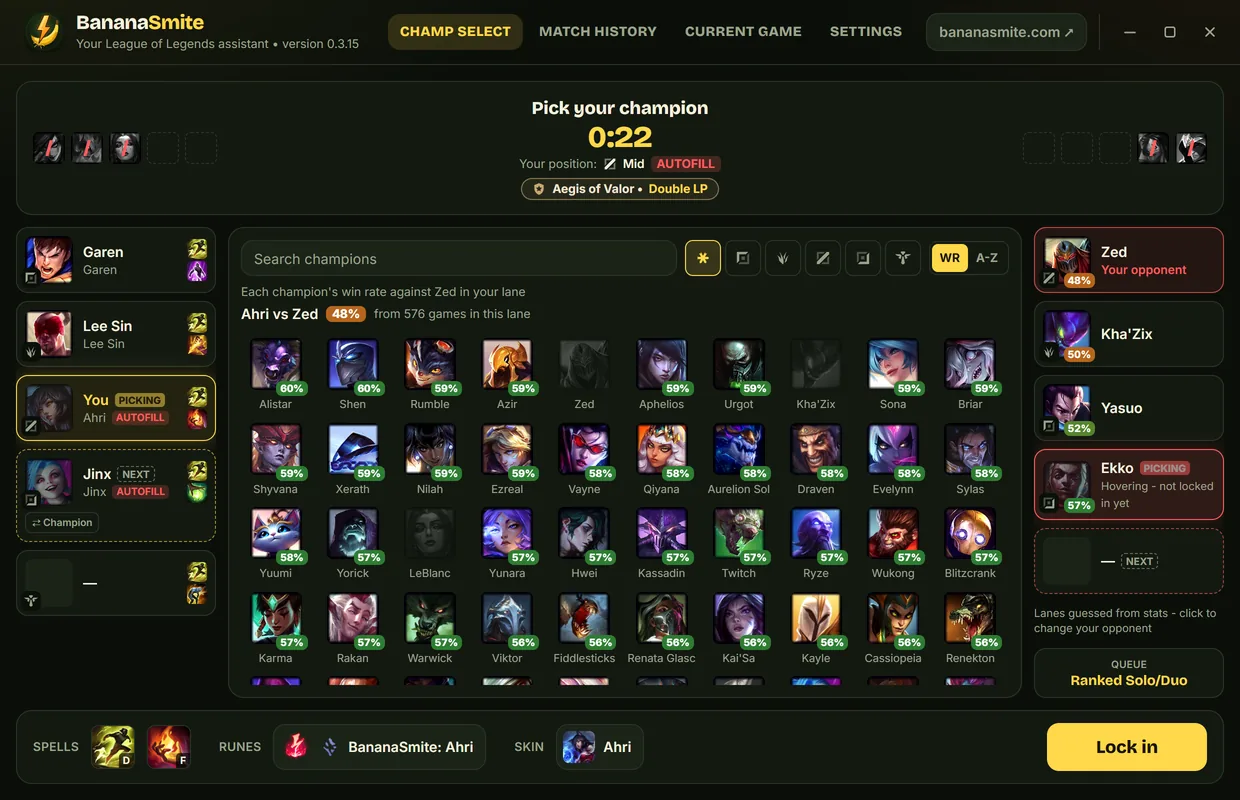
Screenshot of the BananaSmite app: Champ select with matchup win rates

What it does

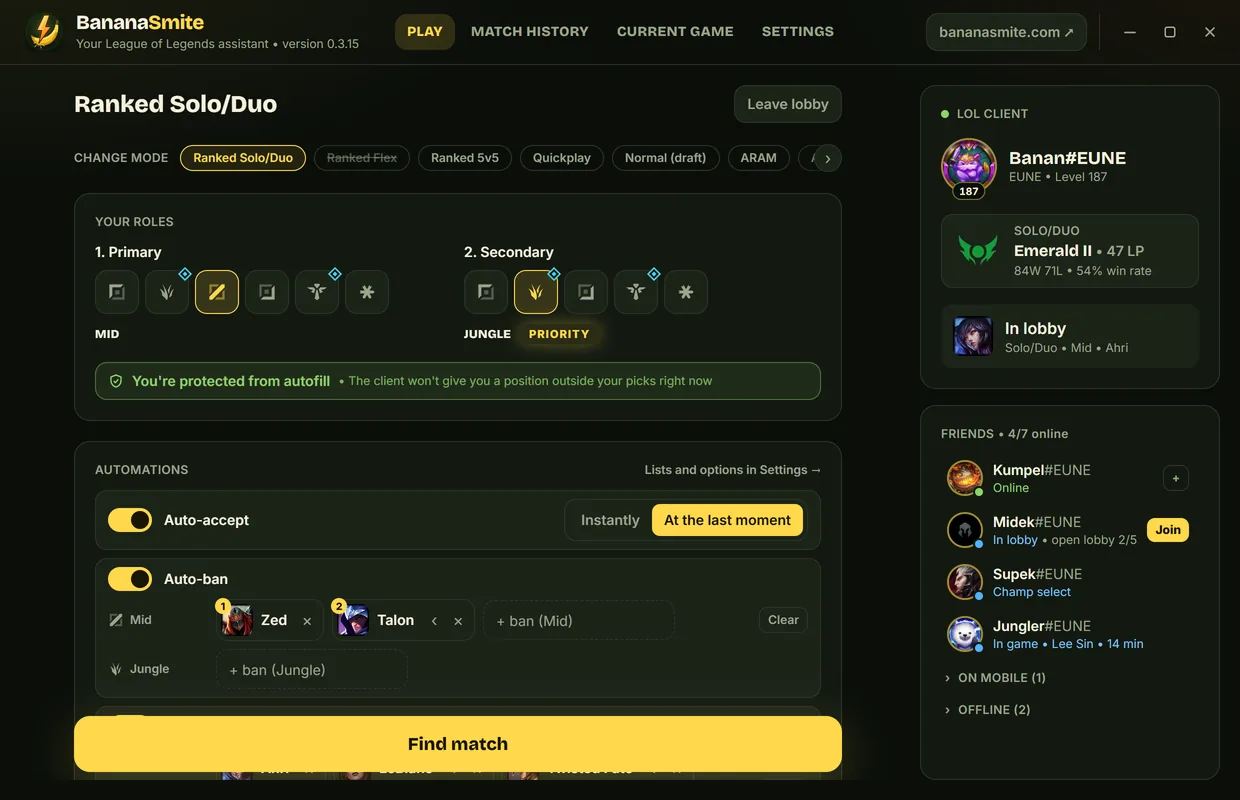
Screenshot of the BananaSmite app: Lobby and automations

Lobby and automations

You pick the mode, your roles and your friends – the app does the rest.

  • Auto-accept – instantly or at the last moment, so you can still decline
  • Auto-ban and auto-pick with a separate champion list for every role
  • Position priority and autofill protection right in front of you
  • Friends with invites and joining open lobbies
  • Queue lockout with a countdown
Screenshot of the BananaSmite app: Champ select with matchup win rates

Champ select with matchup win rates

Pick your champion knowing how it does against your lane opponent.

  • Every champion shows its win rate against your lane opponent
  • Enemies show your win rate against their champions – even while they are still hovering
  • Who's picking now and who's next, bans and hovers of both teams
  • Champion, position and pick order swaps with your team
  • The window stays on top when the LoL client pops up near the end of your turn
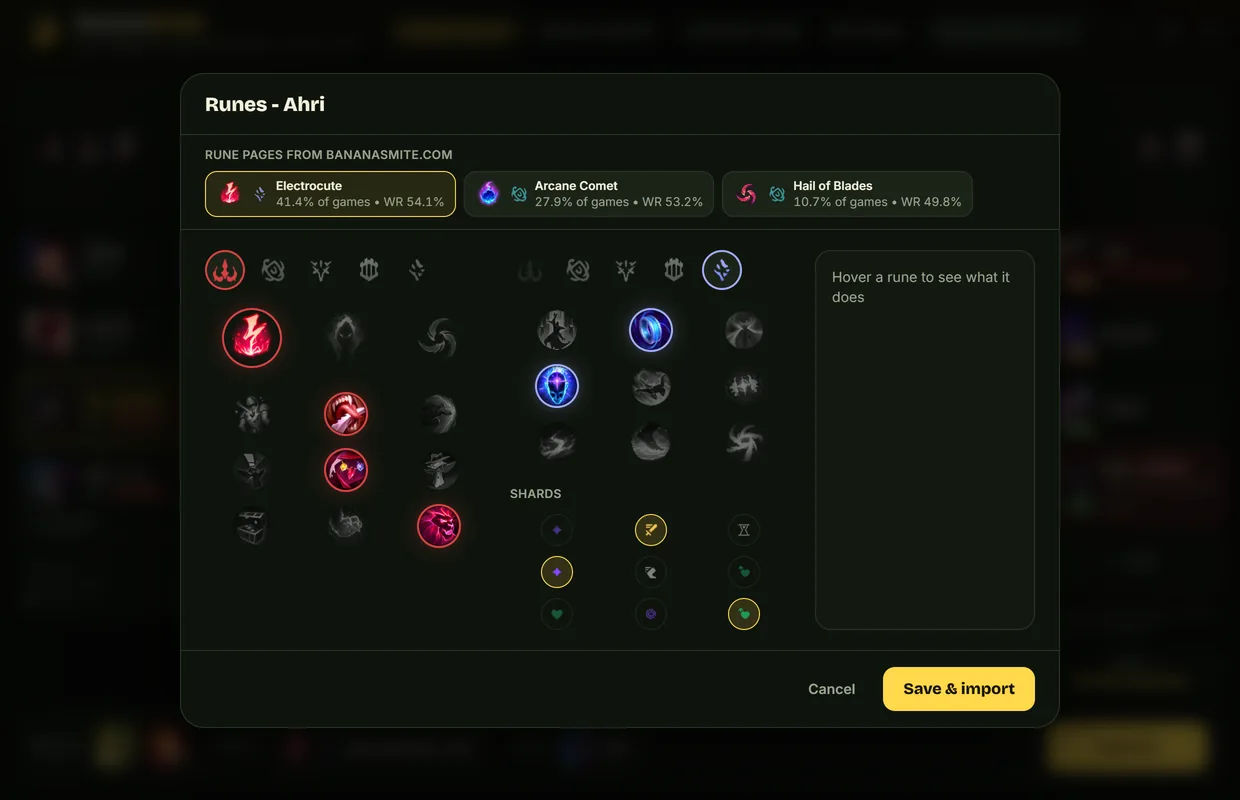
Screenshot of the BananaSmite app: Runes, spells and items

Runes, spells and items

Once you lock in, the build from bananasmite.com goes to the client by itself.

  • Every rune page from our stats – with the popularity and win rate of each
  • A rune editor with descriptions when you want to make it your own
  • Summoner spells (Smite on the jungle is enforced) and item sets
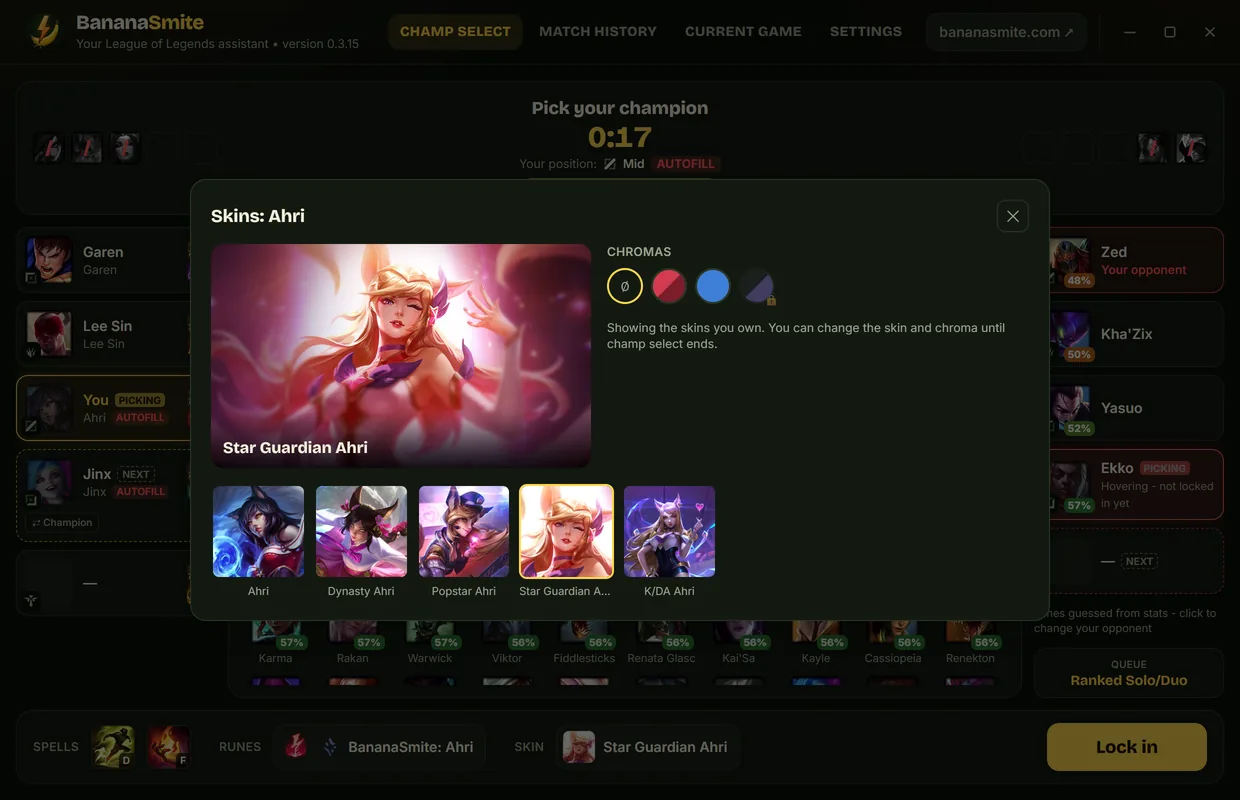
Screenshot of the BananaSmite app: Skins and chromas

Skins and chromas

Once you lock in, pick your skin and chroma right in the app – with a preview.

  • Only the skins you own
  • Chromas as colored circles, just like in the client
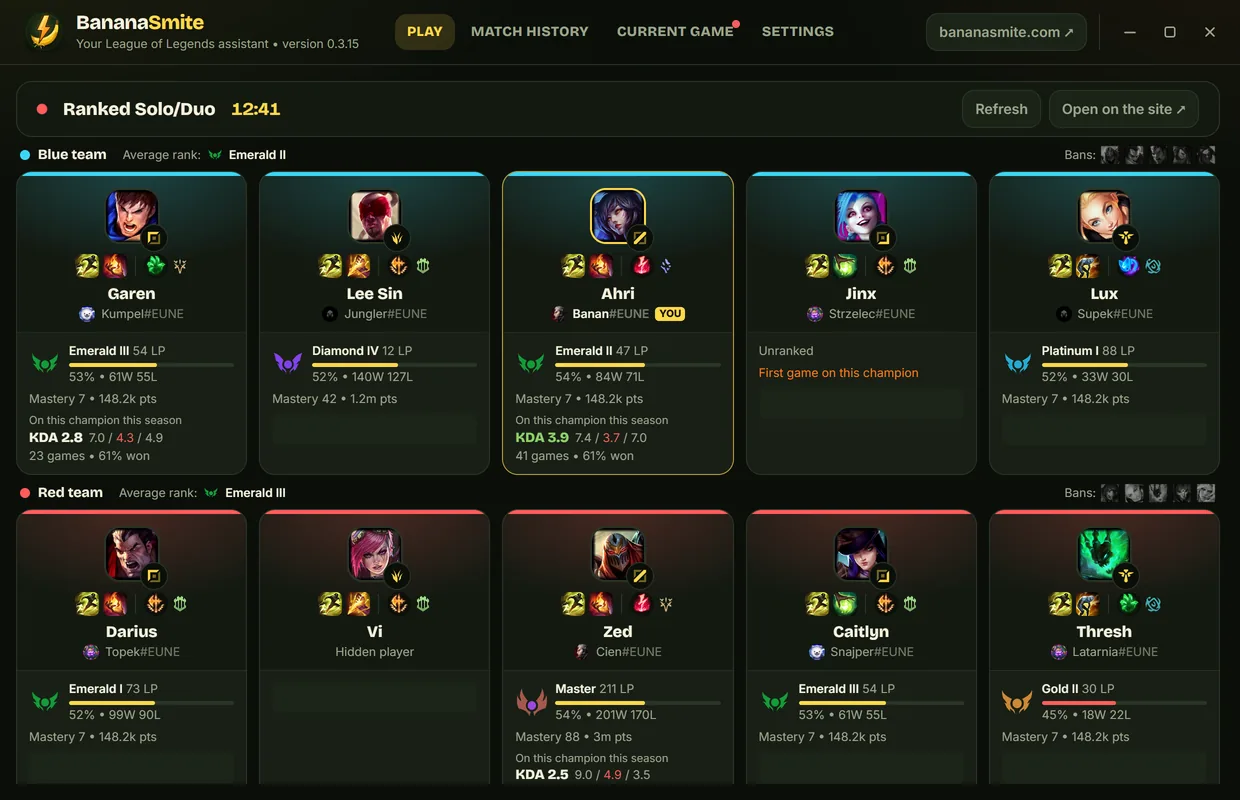
Screenshot of the BananaSmite app: Current game

Current game

Already on the loading screen you see who you're playing with and against.

  • Rank, mastery and KDA on the champion for all 10 players
  • Every player's runes and spells, bans and each team's average rank
  • Click a player to open their profile on bananasmite.com
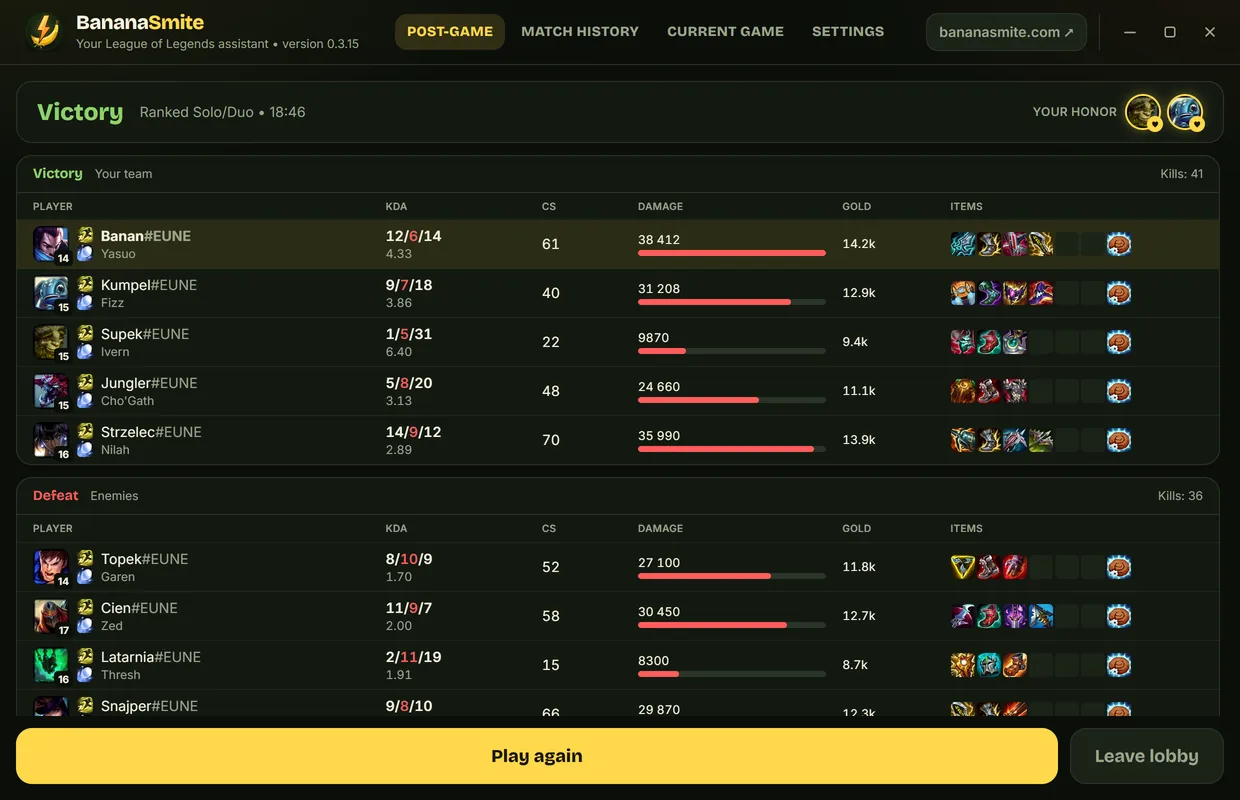
Screenshot of the BananaSmite app: After the game

After the game

Stats of the whole game and honor without digging through the client.

  • KDA, CS, damage, gold and items of both teams
  • Honor in one click, plus the honor others give you
  • “Play again” right after the game
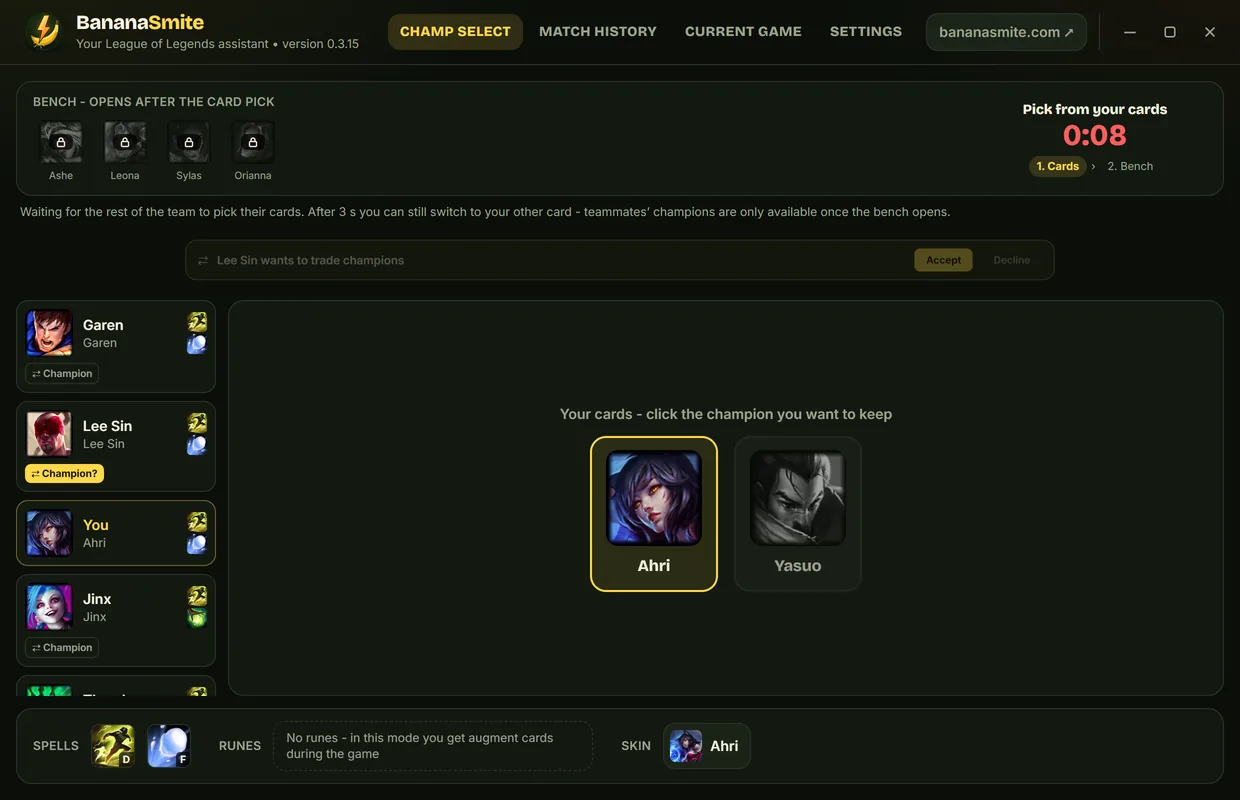
Screenshot of the BananaSmite app: ARAM and other modes

ARAM and other modes

ARAM, ARAM: Mayhem, Arena, Classic, Quickplay and Co-op vs. AI – each with what it needs.

  • ARAM cards and bench with cooldown timers
  • Champion trades with your team in one click
  • Classic ranks, Ranked 5v5 and names for every queue

On your phone too

The BananaSmite Android app connects to the app on your PC – the queue and champ select stay in your pocket when you step away from the desk.

  • Search for games, lobby and friend invites
  • Match found notification with Accept and Decline buttons – on your watch too
  • Bans, champion pick, runes and skins from your phone
  • Pairs with a QR code, encrypted between your phone and your PC
Get it on Google Play

Requires the BananaSmite app for Windows.

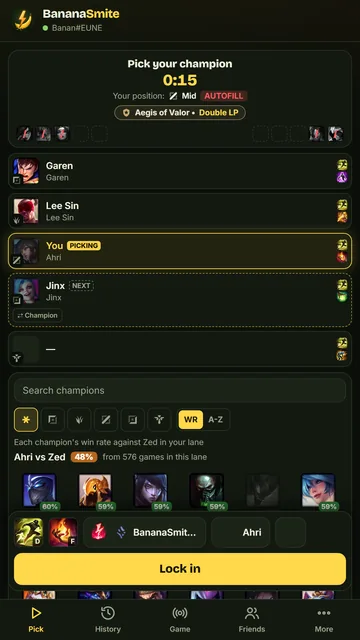
Screenshot of the BananaSmite phone app: champ select

And also

Updates itself

A new version installs in the background when you're not playing – never during champ select or a game.

Safe for the game

It talks to the LoL client only through its local API – the same one the client itself uses. It doesn't read the game's memory or change anything in it.

Lightweight

The installer is a few MB, and the app waits in the tray next to the clock and can start with Windows.

English and Polish

Pick the language in the app's settings.

Getting started

  1. 1Download BananaSmite-setup.exe and run it – it downloads the latest version by itself.
  2. 2Start League of Legends – the app connects to the client on its own.
  3. 3Turn on the automations you want and play.
Download for free

Questions

Is it safe for my account?

The app doesn't read the game's memory, doesn't inject anything into it and doesn't change its files – it talks to the LoL client only through its local API, like other popular assistants.

Windows warns me before running the installer

The app is new, so SmartScreen may not know it yet. Click “More info” and then “Run anyway”.

Does it work on Mac or Linux?

For now only on Windows 10 and 11.

What data does it send?

Every 5 minutes just its version number (no identifier), so we know how many people use it. A problem report reaches us only when you send it yourself.

How do I uninstall it?

Like any program: Windows Settings → Apps → BananaSmite → Uninstall.

Privacy policy

Latest changes

  1. 0.3.65November 22, 2026

    • Your phone no longer freezes after the PC wakes up or Windows corrects the clock - LoL client updates arrive right away
    • With two paired phones, updates reach both at the same time
  2. 0.3.64November 22, 2026

    • Your phone no longer briefly shows an older LoL client state (e.g. champ select or party) - updates always arrive in order, also with two paired phones
  3. 0.3.63November 22, 2026

    • LoL client updates reach your phone as soon as the client answers - a slow answer to one request no longer holds up the others (completes the 0.3.62 fix)
All changes
  1. 0.3.62November 22, 2026

    • Your phone gets LoL client updates (champ select, party, queue) without delays, even when the client is slow to answer one of the requests
  2. 0.3.61November 17, 2026

    • KDA in the app is calculated and shown the same way as on the website; a player with only 0/0/0 games (e.g. remakes) is no longer marked red
  3. 0.3.60November 17, 2026

    • Item set for supports: World Atlas (the game gives it for free at the start) before the upgrades, without rare picks
    • In the live game view KDA below 2 is red again, and the KDA colour matches the shown (rounded) value
  4. 0.3.59November 17, 2026

    • KDA in colours like on the website: Perfect gold, 5+ orange, 4+ blue, 3+ teal - in the live game view and after the game
    • In-game shop item set for supports: which final support item upgrade to pick (most common picks)
  5. 0.3.58November 12, 2026

    • Players queuing together in the current game get a person icon and a colour by group size: duo purple, trio orange, 4-5 players blue
    • On the phone in live mode: your goals for the game (CS per minute, max deaths, kill participation) - editable, saved on the phone
  6. 0.3.57November 12, 2026

    • Updates inside the app window: download and install progress in the BananaSmite installer style, without the plain Windows installer window - the app restarts by itself afterwards
  7. 0.3.56November 10, 2026

    • The party leader can kick a player from the party - in the app and on the phone, with a confirmation
  8. 0.3.55November 10, 2026

    • After an app error the window no longer pops up during a game, and a repeating error doesn't loop restarts
    • The LoL client is detected even when several clients run on the PC (e.g. another Windows user)
    • Second screen on the phone: the scoreboard no longer disappears on a brief connection error, the game clock starts at 0:00, and teams don't swap sides
    • Champ select stats, runes and items refresh after a new patch without restarting the app
    • Less memory used while browsing skins, phone names with special characters shown correctly
  9. 0.3.54October 29, 2026

    • Fix for the Windows Defender false alarm after updating to 0.3.53: the app connects to the LoL client through the official lockfile and no longer reads other programs' data
    • Updates install with a visible progress bar
  10. 0.3.53October 28, 2026

    • Champ select: players hidden by the game get creature names like in the client (Gromp, Krug, Raptor…) instead of the champion name
    • Post-game: the place in the table also shows how the game went - Leader, Solid, Carried, Unlucky, Downfall…
  11. 0.3.52October 28, 2026

    • Post-game: a 0-10 score for every player (Banana Score, same as on bananasmite.com) with MVP and ACE, plus your score and your rank with the LP change after a ranked game
    • Current game: who plays together (duo, trio, 4 and 5 players) - players who were on one team in at least 2 of their last 20 games
    • Phone: a live scoreboard from your PC during the game - KDA, CS, items and item gold for both teams and every lane (with the phone app 1.0.3)
    • Window X button: choose in the settings - hide to the tray or quit the app; the X works again after starting with Windows
    • After an app crash, a window with the error and “Send log” / “Don't send” buttons
    • Post-game stats no longer disappear after a brief client error
  12. 0.3.51October 28, 2026

    • Invites: the inviter's name shows up even after a brief client error (it used to say “Someone” until a restart)
    • Quickplay: a champion's win rate in a slot comes back after a brief site error
    • Current game: when several teammates play the same champion (e.g. One for All), cards no longer show someone else's games
    • Phone app: Refresh in the current game tab reloads the game
  13. 0.3.50October 28, 2026

    • Updates no longer install while you're in queue - restarting the app won't miss a found match (auto-accept)
    • Party members' names show up even after a brief client error (they used to stay blank until a restart)
    • Smoother champ select - the champion grid is recalculated only when its data changes
  14. 0.3.49October 28, 2026

    • Settings → Phone app: a “Get it on Google Play” button – also in the phone pairing window
  15. 0.3.48October 27, 2026

    • Current game: “Main” only on the player’s highest-mastery champion (from 50k points); another champion with over 100k points gets the “Experienced” tag
    • Current game: KDA and win rate on the champion no longer count remakes (they used to count as 0/0/0 losses)
  16. 0.3.47October 27, 2026

    • On small screens with high scaling the window no longer jumps to the center on every click
    • Korean server (KR): the app doesn't use the client right after it starts either, before you log in
    • Champ select: when the LoL client pops up by itself while you're moving the mouse on another screen, the app window stays on top
  17. 0.3.46October 26, 2026

    • Korean server (KR): the app doesn't use the LoL client - Korean law prohibits programs that interact with the game
    • A window stuck at the size of its title bar (it looked like the app wouldn't open) goes back to its normal size
    • Notifications on the right - they don't cover the Lock in / Ban button
    • Current game: "Main" only with a long history on the champion (100k+ mastery points); many recent games on it is "Plays it a lot lately"
  18. 0.3.45October 25, 2026

    • Current game: players' KDA on their champions from the last 20 games (was 50) - loads noticeably faster
  19. 0.3.44October 25, 2026

    • Current game: other players' KDA on their champions loads again (the client took long to fetch their games and the app stopped waiting) - results appear player by player
    • Current game: player tags like in Porofessor - win / loss streak, main, farmer, high KDA, off-role, long break from the queue (explained on hover)
    • Champ select: before banning a champion a teammate wants to play, a dialog like in the client - in ranked it tells you it can't be banned, in other queues it asks if you're sure
    • Champ select: when you switch to another program yourself (Alt+Tab, Windows key, clicking elsewhere), the window steps back and doesn't take focus - it's on top again once you return to it
    • Swaps: no swap buttons for a player who's in the middle of a swap with someone else
  20. 0.3.43October 24, 2026

    • Champ select: until your lane opponent is known, every champion's tile shows its win rate in your lane (from bananasmite.com stats) - the tiles used to be empty
    • Rune editor: 3 rune pages from bananasmite.com, like on the champion page (there were 5, some nearly identical), and the page you click is always marked
  21. 0.3.42October 23, 2026

    • Quickplay: the Ready button works (it used to fail with an error), and picking a champion for a slot has a lane filter - set to the slot's lane right away
  22. 0.3.41October 22, 2026

    • Following Riot's developer policies: no chat (conversations, team chat, message notifications on the phone) and no reporting or honoring players - you do that in the LoL client; after the game the app reminds you about honor and shows the stats
    • Champ select doesn't show the name of a player hidden by the game; the settings say that BananaSmite isn't endorsed by Riot Games
    • Security: the browser opens only bananasmite.com pages, up-to-date connection encryption libraries (TLS)
  23. 0.3.40October 21, 2026

    • Champ select: the LoL client refusing a hover or lock is now shown (instead of nothing happening), "Fill" from the lobby isn't shown as autofill, and a Fill lobby shows the auto-ban and auto-pick lists for every role
    • Rune editor: a page without all shards gets the defaults and can be saved
    • Friends: a brief client error doesn't clear the list, and a declined invite can be sent again after a moment; a player's rank doesn't show "Unranked" after a brief client error
    • Live game: a finished game doesn't come back to the tab; closing the LoL client while on History or Live game takes the window back to "Play" instead of a blank screen
    • Settings that couldn't be saved go back to the previous ones (with a message you can close); the installer protects the downloaded file from being swapped until the installation finishes
  24. 0.3.39October 20, 2026

    • Quickplay: picking a champion and role in the app works like in the client - your last skin and rune page for that champion, Smite on jungle (also with rune and spell import turned off)
  25. 0.3.38October 20, 2026

    • Quickplay: runes and spells download in the background - the app won't be late accepting the match, and a change in the other slot isn't undone while downloading; you get a message if the download fails
    • Little Legend instead of a ward only where the LoL client shows it (ARAM, ARAM: Chaos, Poro King) - Summoner's Rift modes with a bench show the ward again
  26. 0.3.37October 20, 2026

    • Quickplay: runes and spells from our stats are set in the lobby when you pick a champion or role in a slot - also in the LoL client (this mode has no champ select)
  27. 0.3.36October 20, 2026

    • ARAM: instead of a ward (there are none there) you pick your TFT Little Legend - just like in the LoL client; on the phone too
  28. 0.3.35October 20, 2026

    • Match history: after a brief internet outage the page reloads on its own once you're back online - no need to click "Try again"
  29. 0.3.34October 20, 2026

    • Bug fixes
  30. 0.3.33October 20, 2026

    • Window: lighter content fitting while dragging the window edge
    • Auto-ban: with an empty shared ban list the message now refers to it instead of the role's list
  31. 0.3.32October 20, 2026

    • Bans: "Same bans for every role" - one list for all roles, and a role's list can be copied to other roles
    • Champ select: no autofill tag on other players - just like the LoL client
    • Window: after enlarging it (e.g. during champ select) the content fits the new size - before it could stay at the old one
    • Phone app: in champ select the same team cards as on PC (pick order, role, pick order and champion swaps) and a readable current game
    • Phone app: a clear message when the PC app is off; saved accounts - match history and the friends list work without the PC too
  32. 0.3.31October 17, 2026

    • Current game: real roles also show up when the game reports them a moment after loading, and never repeat within a team
    • Team chat: the unsent text stays the same after resizing the window
    • The friends list and the chat share one list from the client (fewer requests)
    • Phone app: the ready check result only follows a "Match found" notification; the cursor stays in place when fixing the pairing code
  33. 0.3.30October 17, 2026

    • Post-game lobby: a party member who hasn't returned yet is greyed out and "Find match" waits for them instead of a 400 error
    • Hovering a chroma previews it (unowned ones too) - like skins
    • Current game: real player roles from the game (once it loads) instead of guessed ones
  34. 0.3.29October 17, 2026

    • Report players after a game: a flag next to each player in the match stats - the same reasons as in the LoL client (up to 3) and a comment
    • Team chat in champ select: text you typed but didn't send no longer disappears when you collapse the chat - the collapsed chat shows it and it's back in the box when you expand it
    • Chat: under a friend's name you can see what they're doing - online, in a lobby, in queue, in champ select or in game (with the champion and game time)
    • Match history: when bananasmite.com fails to load (e.g. "refused to connect"), the app retries on its own and then shows "Try again" and "Open in browser" instead of an error
    • Phone app: the match found notification no longer disappears - after the ready check it shows whether the match started or someone didn't accept; tapping a player in the current game opens their match history
  35. 0.3.28October 17, 2026

    • When the LoL client briefly stops responding (loading screen, patching, a slower PC), the app no longer disconnects - in champ select it doesn't start over or overwrite runes you set manually
  36. 0.3.27October 16, 2026

    • The champion search has an "✕" that clears everything you typed at once (Escape too) - in champ select, when picking a champion for Quick Play and in the auto-ban / auto-pick lists
    • The Update button no longer starts a second installation while an update is already installing in the background
  37. 0.3.26October 16, 2026

    • Phone app: notifications for game invites (who and which mode) and messages from friends (name and text, encrypted)
    • Your phone stays quiet only if you use your PC after the event - walking away right before a match no longer costs you the notification; new "Also at the PC" option
    • Friends in a lobby are shown in green
  38. 0.3.25October 16, 2026

    • Match history: the Back button next to Update returns to the previous profile, and clicking Match history on someone else's profile takes you back to yours
  39. 0.3.24October 15, 2026

    • The ward skin picker shows only the skins you own
    • Fixes: the chosen ward no longer jumps back on screen, the ward list opens faster, the Accept button in the phone notification on a weak connection
  40. 0.3.23October 15, 2026

    • Ward skins in champ select: all of them with search, unowned greyed out, the selected one marked (also from the phone)
    • ARAM: bench champions you don't own are greyed out and can't be taken - like in the client
  41. 0.3.22October 15, 2026

    • Pairing with your phone is better secured (new pairings need phone app 0.1.2)
    • The Accept button in the phone notification shows whether the match was really accepted
    • Fewer unnecessary phone notifications, and an interrupted pairing removes itself
  42. 0.3.21October 15, 2026

    • The phone app can start League of Legends on your PC
  43. 0.3.20October 15, 2026

    • Phone app: connect your phone with a QR code (Settings → Phone app) and control the LoL client from it - queue, accept, champ select, chat; match notifications when you are away from your PC
  44. 0.3.19October 15, 2026

    • On red side the team chat shows the same hidden names as the LoL client (Gromp, Krug…)
    • Accepting an invite while you're in your own lobby no longer says "Joined" when joining failed
    • A collapsed team chat no longer shows extra message pop-ups
    • Auto-ban in "Hover only" mode no longer logs an error when you don't ban
    • Rune descriptions are displayed more safely
  45. 0.3.18October 15, 2026

    • The team chat in champ select now sits on the left, under your team - like in the client; you can collapse it to one line
    • The lobby party chat is only in the "Chat" panel (no box in the lobby view or while searching for a game)
    • Invite friends to your lobby even when they're in another lobby or searching for a game (not while they're in champ select or in a game)
    • Auto-ban: choose "Hover only", "Instantly" or "Before the timer ends" - just like auto-pick
  46. 0.3.17October 15, 2026

    • Chat: talk to friends and use the group chat in the lobby, champ select (hidden names like in the client) and post-game - a "Chat" button in the header with the unread count and pop-ups for new messages
    • The party chat shows right in the lobby under the players, also while searching for a game
    • A message button next to every friend on the list
    • The skin window also shows skins you don't own (preview only, on hover), and the selected skin is clearly marked
    • Champ select no longer shows champions you don't own (bans still show everyone)
    • The header fits in a narrow window too
  47. 0.3.16October 14, 2026

    • A maximized window no longer shrinks when the app comes back on top in champ select
    • Header tabs no longer wrap onto two lines
    • Background updates wait for a few minutes without mouse or keyboard input (not right after hiding the window)
    • Lower CPU use: the Play view refreshes every second only during a queue lockout
  48. 0.3.15October 14, 2026

    • Updates: a new version also installs in the background when you're not using the app (LoL closed, window hidden or a few minutes without input)
    • Changelog: click the version in the header to see every change with dates; after an update a "What's new?" bar shows up
  49. 0.3.14October 14, 2026

    • Updates: a new version installs itself after the computer starts or wakes up (can be turned off in settings)
    • A window that stopped responding after the computer woke up reloads itself, and as a last resort the app restarts; a window off screen comes back to the middle
    • Champ select: a separate keyboard focus switch in settings, independent of keeping the window on top
    • Classic ranks: emblems for Salt, Wood, Legend and the other Classic ranks, and the Classic rank in Classic lobbies
  50. 0.3.13October 14, 2026

    • Champ select: choose your skin and chroma after locking in (in ARAM right away)
    • Champ select: the app stays on top and keeps the keyboard when the LoL client pops up near the end of your turn (can be turned off in settings)
    • Champ select: an accidental click on an enemy without a champion changes nothing, and clicking your chosen opponent again goes back to guessing lanes
    • Lobby: the queue lockout no longer says who has it
  51. 0.3.12October 13, 2026

    • Champ select: your champion's win rate against every enemy (also while they're hovering) and a "your champion vs lane opponent" line; greyed-out enemy picks still show the win rate
    • Champ select: search looks through all champions - the lane filter turns off while you type
    • Champ select: a swap clicked by both players at the same moment no longer shows an error, and the other player's request is accepted right away
    • Champ select: champion trades work again (the LoL client changed the address)
  52. 0.3.11October 13, 2026

    • Lobby: queue lockout with a timer – who is penalized and why (dodge, leaving games...), countdown on the Find match button
    • Mode tiles: penalty time counts down live
  53. 0.3.10October 13, 2026

    • Post-game: honors shown as hearts, and after your last vote the app submits and moves on to the stats
    • Post-game: "Your honor" – honors you received, with the sender's champion (hover to see who honored you)
    • Lobby: Ranked 5v5 rank (weekend queue)
    • Names for every queue (ARAM/URF Clash, Co-op vs. AI, Arena, Swarm, One for All, Doom Bots...) instead of "Featured"
  54. 0.3.9October 13, 2026

    • Match search: shows which queue you're searching in, and the ring fills up and starts over
    • Champ select: who's picking now and who's next (both teams), enemy hovers, bans always visible, queue name under the enemies
    • Champ select: hover your champion while others pick (lock in on your turn), and the pick-order swap disappears after picks
    • Rune editor: every rune page from bananasmite.com, not just the most popular one
    • Quickplay: Ready button for party members, champion win rate in the role and your recent games on it
    • Friends: Join an open lobby
    • Post-game: you can give all the honors you have (before only 1)
    • Live game ordered TOP, JG, MID, ADC, SUPP
    • Starting with Windows: the app only sits on the taskbar instead of popping up
  55. 0.3.8October 10, 2026

    • Live game: every player's KDA on their champion from recent games
    • Fixed: lobby role selection and bans (all champions were greyed out, auto-ban didn't ban)
    • On jungle the app won't let you remove Smite
    • Play: PvP and Co-op vs. AI tabs, lobby modes in one scrollable row
    • Classic and Arena: their own spells and a mode guide; no runes in ARAM: Mayhem and Arena
    • ARAM: card / bench steps and 3 s locks like in the client
    • After an update the app window pops up
  56. 0.3.7October 10, 2026

    • Fixed ARAM: Mayhem: clicking a rolled champion card now picks it (before nothing happened)
    • Post-game: honor in the app - cards of both teams with stats from the game, click to honor
    • Post-game: stats of both teams like in the match history (KDA, CS, damage, gold, items)
    • Post-game: Play again and Leave lobby, just like in the client
  57. 0.3.6October 9, 2026

    • Fixed Current game: the game now shows up during the match instead of waiting forever
    • Custom window bar in the app's style (drag by the header, minimize, maximize, hide)
    • New modes: Ranked 5v5 (with auto-ban and auto-pick), ARAM: Mayhem and “Other modes” from the client (Arena, vs. AI)
    • Invites from friends: Join / Decline right in the app - while LoL is updating it tells you why you have to wait
    • Party leader: private or public lobby and invite rights for party members
    • After an update the window comes back if it was open or you clicked Update
    • Match history without the “Open in browser” button
  58. 0.3.5October 9, 2026

    • Current game tab styled like the loading screen: 2 rows of 5 cards with rank, record, mastery, runes and champion stats
    • Current game opens only once the game shows up on bananasmite.com - no more “not in game” and manual refreshing
    • New Match history tab - your profile like on the site; clicking a player in the current game shows their history
    • “Report a problem” in Settings: a note with the log and the course of your last game (no player names), with a preview before sending
    • The activity log is now always in English
  59. 0.3.4October 9, 2026

    • Fixed auto-ban: the LoL client marks bans as active already during declare intent, so the app banned too early and the server ignored it - it now hovers and bans only in the ban phase
    • A champion on both your pick and ban list for a role is marked (an orange exclamation mark with an explanation), and the log says auto-ban skipped it because it's your pick
    • The log says “Banned” only once the client confirms the ban - and tells you if the ban didn't go through
    • In the app's champ select, clicking a champion during declare intent hovers your pick again (not the ban)
  60. 0.3.3October 9, 2026

    • Auto-ban bans at the last moment: it hovers the champion right away (your team sees it) and bans just before the timer ends, without doubling your team's bans
    • “Start League of Legends” starts the game itself through the Riot Client - also when the Riot Client is already running or you picked LeagueClient.exe
    • Clicking “Start” greys out both buttons (in the middle and in the right panel)
    • Clear a whole auto-ban or auto-pick list right on the lobby page
    • Pressing Enter in an empty champion box no longer adds a random champion
  61. 0.3.2October 9, 2026

    • Friends list on the right: who's online, who's playing (champion and game time), lobby invites and bananasmite.com profiles; friends on mobile and offline are collapsed at the bottom
    • The activity log moved to the bottom of Settings (“Show the log” button)
    • Add auto-ban and auto-pick champions right on the lobby page
    • Custom LoL installs: the app remembers where the game is, and if it can't find it you can pick the file (on the Play page or in Settings)
    • A “Start League of Legends” button when the client is closed
    • Background updates no longer steal focus - the new version starts hidden in the tray, with a notification
    • “Update” during champ select or a game installs only after it
    • A smooth ring when a match is found (no stutter)
  62. 0.3.1October 8, 2026

    • Priority positions are marked with a diamond like in the LoL client, with “Priority” under the chosen position
    • The “Your roles” section shows whether you're protected from autofill
    • The “Find match” button is always visible - it floats at the bottom of the window until you scroll to its place
    • Champ select: an Aegis of Valor badge (double LP for a win when autofilled) with a description on hover, and autofilled players are marked
    • A hand cursor on everything you can click
  63. 0.3.0October 8, 2026

    • Player icons, levels and ranks in the lobby, plus your profile with rank in the right panel (click your name to open your bananasmite.com profile)
    • Auto-accept: instantly or at the last moment (until then you can still decline)
    • Auto-accept, auto-ban and auto-pick shortcuts on the lobby page
    • Only the modes your account can play, plus clear messages when the client blocks a queue
    • ARAM: champion cards, the bench and trades
    • Champ select: trade champions, positions and pick order with your team
    • Your primary role (priority) and autofill protection are shown, and champ select tells you if you got your primary, secondary or autofill
    • Errors come with a banana joke and a clear reason
    • The Current game tab without extra buttons and without the right-click menu
    • Smooth countdown when a match is found and in queue
    • Confirmation before clearing your ban and pick lists
    • After an update, the activity log shows what's new
  64. 0.2.2October 8, 2026

    • Current game in a tab of the main window
    • Quickplay (Swiftplay) with roles and champions
    • The party leader can change the lobby mode
  65. 0.2.1October 8, 2026

    • Updates show up within 2 minutes
    • Clearing the ban and pick lists